If you’re running a Rs-485 network, few things derail operations faster than signal interference turning a smooth data stream into garbled, intermittent messages. As a Rs-485 cable supplier, I’ve fielded this question dozens of times from installers, electricians, and facility managers who’ve spent hours troubleshooting connections that looked right on paper but failed in practice. Rs-485 is the workhorse of industrial automation, building management systems, and IoT sensor networks for a reason—it’s long-range, multi-device, and rugged by design—but it’s also a differential signaling protocol, which makes it surprisingly sensitive to its physical environment. The good news? Installing a Rs-485 cable without interference isn’t about being a electrical engineer with a decade of experience; it’s about following a few consistent, science-backed rules that prioritize signal integrity over convenience. Let’s walk through what works, what doesn’t, and the small, cost-effective choices that make all the difference. Rs-485 Cable

First, let’s ground this in why Rs-485 is prone to interference, because skipping the “why” makes it easy to cut corners you’ll regret later. Rs-485 relies on balanced differential signaling: it uses two wires (usually labeled A and B, though we’ll circle back to proper labeling in a minute) to transmit a signal, with data encoded as the voltage difference between the two, not the voltage of a single wire relative to ground. That design is inherently more noise-resistant than older single-ended protocols, but only if the two wires are identical in length, twist rate, and routing. If they run parallel to a 120V AC power cable for 10 feet, for example, that AC current will induce a voltage spike into both A and B, and since the difference between the two is what the receiver reads, the spike will nearly cancel out. But if the A wire runs 12 feet and the B wire runs 10 feet, or the twist rate halves halfway through, the spike won’t cancel out—and suddenly you’ve got a signal error. That’s the core of Rs-485 interference: it’s not just outside noise, it’s uneven handling of that noise by the signal pair.
Let’s start with the most basic, often overlooked step: choosing the right cable in the first place. As a supplier, I see installers grab any two-conductor cable from their van because it’s cheap, but that’s the first mistake. Rs-485 specifically requires a twisted-pair cable, and not just any twisted pair—unshielded twisted pair (UTP) works for short runs (under 500 feet, per standard specifications), but shielded twisted pair (STP) or foil-shielded twisted pair (FTP) is non-negotiable for runs over 500 feet, or any installation that puts the cable near heavy machinery, AC power, or outdoor elements. The shield isn’t just for “extra protection”—it’s a barrier that keeps external noise from coupling into the signal pair, and it works only if it’s grounded properly. I always advise customers to avoid “generic” twisted pairs: we engineer our Rs-485 cable with a consistent twist rate of around 1 twist per 6 inches, which is calibrated to balance signal integrity and flexibility for typical industrial and commercial installations. A cable with a variable twist rate will leave tiny, unbalanced gaps where noise can leak in, even if it’s a “twisted pair.” Also, skip solid-core cable for runs longer than 100 feet; stranded core is more flexible, and for Rs-485, the thin strands reduce skin effect (a high-frequency signal loss that happens when current flows only on the outer edge of a solid wire) which leads to clearer signals over long distances.
Next, routing the cable correctly is where most interference happens, even with a high-quality Rs-485 cable. The golden rule here is: separate your data cables from power cables by at least 12 inches, and if they have to cross, cross at a 90-degree angle, not parallel. I can’t tell you how many times I’ve seen a technician pull a Rs-485 cable through the same conduit as 240V AC power, and wonder why their network drops out whenever the warehouse overhead doors open. AC power emits a 50/60Hz electromagnetic field, which couples into unshielded or improperly shielded data cables when they run parallel. If you have to route both in the same raceway or conduit, use a metal conduit instead of plastic—metal acts as a Faraday cage, blocking noise from transferring into the Rs-485 cable. Never ground the metal conduit at more than one point, though; multiple ground points create a ground loop, which is another major source of interference. For outdoor runs, avoid running Rs-485 cable along the same path as power lines or antenna cables. If outdoor routing is unavoidable, bury the Rs-485 cable at least 18 inches deep, and use direct-burial rated STP cable with a dedicated drain wire for grounding—don’t just use an indoor-rated cable with a plastic jacket, as it won’t protect against moisture and indirect noise from power lines overhead.
Termination is another make-or-break step that’s often skipped. Even the best Rs-485 cable won’t perform if you don’t terminate it correctly. First, label your wires properly: the industry standard is to label one conductor “A” (often positive, though voltage polarity doesn’t strictly matter as long as consistency is maintained) and the other “B” (negative). If you mix up A and B, you’ll get a mirrored signal, which will also cause errors—so use a permanent label (heat-shrink markers are cheap and effective) to avoid mix-ups in future maintenance. Next, terminate the shield correctly. I can’t stress this enough: a shield that’s not grounded at one end is no better than no shield at all, and a shield grounded at both ends is a recipe for ground loop interference. The rule of thumb is: for runs under 1,000 feet, ground the shield at only one end (the end closest to the network’s master controller, which has a stable ground reference); for runs over 1,000 feet, you can ground both ends, but only if you test the ground potential between the two ends first. If the voltage difference between the two ends is more than 1V, grounding both ends will create a current that flows through the shield, inducing noise into the signal pair. When you terminate the shield, don’t just twist it into a knot and stuff it in the connector—use a shielded RJ45 terminal or a compression ferrule that makes a 360-degree contact with the shield, which eliminates gaps that noise can slip through. Also, never cut the drain wire (the small wire paired with the shield) too short; it’s your grounding conductor, so make sure it extends at least 1/2 inch past the jacket to connect to the ground lug.
Then there’s the often-forgotten step of using terminating resistors. Rs-485 networks require a 120-ohm terminating resistor at the two endpoints of the bus, right where the master device connects to the final slave device. This resistor absorbs signal reflections, which are like echoes that bounce back from the end of the cable and interfere with the original signal. A lot of installers skip this because their network “works” without it, but as cables get longer or have more devices, reflections become a major source of intermittent interference. Don’t just grab a random 120-ohm resistor from your parts bin—use a precision surface-mount or through-hole resistor rated for low-temperature operation (industrial networks run in extreme environments, so a cheap resistor can fail or add noise). Also, make sure you only have two terminating resistors on the entire bus; if you accidentally add one on a mid-line device, you’ll create a short or unbalanced load that causes signal loss. I always recommend marking which ports have terminating resistors during installation, so when you add a new device later, you don’t accidentally add a third one.
Let’s talk about common mistakes that even experienced installers make, because these are the ones that cause the most head-scratching interference. One is running the cable around sharp edges without protection—sharp bends can crimp the twisted pair, flattening it and ruining the balance between A and B wires. A bend radius smaller than 10 times the cable’s diameter will also break the shield’s continuity, so always use cable clamps or conduit fittings that leave a smooth radius, especially for outdoor installations. Another mistake is daisy-chaining devices too closely, or running a cable that has more than 32 slave devices (that’s the hard limit for standard Rs-485 networks). Too many devices draw excess current, which can cause voltage drops that make the signal too weak to resist interference. If you need more than 32 devices, use a Rs-485 repeater to extend the bus, which also isolates noise between segments. Also, avoid running Rs-485 cable parallel to Ethernet or coaxial cable; those data cables emit their own electromagnetic noise, and even shielded Rs-485 can pick up that interference if they run parallel for more than 10 feet.
Now, why does this matter for you, whether you’re installing Rs-485 for a factory, a smart building, or a remote sensor network? I’ve had customers call me at 8PM on a Friday, panicking because their Rs-485 network dropped all the sensor data for their new HVAC system, and it turned out they’d run the cable next to a 120V power line without a shield, and the noise spiked every time the HVAC compressor turned on. Fixing that required pulling the cable away from the power line, adding a shield, and grounding it correctly—costing an hour of labor instead of three days of troubleshooting. The point is, small, intentional choices at installation save a lot of time and money down the line. Our Rs-485 cables are engineered to meet the exact twist rate and shielding specs that make interference resistance possible, but they only work if you install them following those science-backed rules.
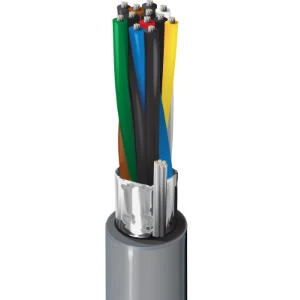
If you’re planning a Rs-485 installation, or you’ve got a network that’s been acting up from interference, we’re here to help. We can walk you through choosing the right cable for your run length, answer questions about routing and termination, and even provide samples of our low-interference Rs-485 cable to test for your project. Don’t spend weeks troubleshooting avoidable interference—reach out to us to discuss your Rs-485 cable needs, and we’ll make sure your installation is smooth, reliable, and free of unnecessary signal errors.
Profinet Cable References
- Industrial Communications Handbook: Rs-485 Network Design and Installation Practices
- TIA/EIA-485-A Standard: Electrical Characteristics of Generators and Receivers for Use in Balanced Digital Multipoint Systems
- National Electrical Code (NEC) Article 725: Class 1, Class 2, and Class 3 Remote-Control, Signaling, and Power-Limited Circuits
- Siemens Industrial Automation Guide: Rs-485 Cable Routing and Noise Mitigation
Zhejiang Chatnow New Material Technology Co., Ltd.
Zhejiang Chatnow New Material Technology Co., Ltd. is well-known as one of the leading rs-485 cable manufacturers and suppliers in China, specialized in providing high quality customized service. Please feel free to wholesale high-grade rs-485 cable at competitive price from our factory.
Address: Building 12, No.9 Huajin Road, ZhouWangMiao Town Innovation Center, Haining, Zhejiang 314400
E-mail: info@chatnow-cable.com
WebSite: https://www.chatnow-cable.com/
